



Most MSPs do not lose money because they charge too little. They lose money in the gaps between service delivery, invoicing, collections, and reconciliation. Tickets get closed, work gets done, and then billing sits in a queue, invoices go out late, payment links are missing, or the accounting entry does not match what the PSA shows.
That gap becomes expensive at scale. APQC benchmarking shows the median Days Sales Outstanding (DSO) is 38 (APQC), which means many companies wait over a month to convert invoices into cash. (apqc.org)
MSP payment automation software fixes this by connecting your PSA time and tickets, contracts, invoices, payment collection, and accounting updates into one repeatable workflow. This guide explains what it is, who it’s for, what features matter, and how MSPs in both the US and India should evaluate and implement it.
Key Takeaways
- Automate invoices and collections so cash flow does not depend on manual follow-ups.
- Connect PSA, billing, payment gateways, and accounting so data stays consistent.
- Use recurring billing and usage-based rules to reduce billing disputes.
- Offer client portals and preferred payment rails for US and India buyers.
- Track failures, retries, and dunning so revenue does not silently leak.
- Choose tools based on workflows, not features on a checklist.
What Is MSP Payment Automation Software?
MSP payment automation software is a system that helps managed service providers generate invoices automatically, collect payments faster, and sync billing data with PSA and accounting tools.
At a basic level, it can:
- Create invoices from contracts, recurring services, subscriptions, and ticket time
- Send invoices on schedule, with payment links and the right tax rules
- Collect payments through supported rails (for example, ACH and cards in the US, UPI and net banking options in India, depending on your setup)
- Push records into accounting (for example, invoice status, payment received, fees, and deposits)
- Track failures, retries, and overdue invoices with reminders
At a mature level, payment automation becomes a “quote-to-cash” backbone where invoicing, collections, and reconciliation happen in a predictable loop. That is what reduces errors, improves cash flow visibility, and makes financial reporting less stressful.
If your billing depends on spreadsheets, manual exports, or someone “remembering to send invoices,” you are already paying for this problem in time, write-offs, and delayed revenue.
Why MSPs Need Payment Automation
MSPs sit in a tough operational reality: recurring services, add-ons, device counts, cloud subscriptions, time-based work, and multi-year contracts can all exist in the same customer account. When billing is manual, complexity turns into leakage.
Late Payments Are Common, And They Hurt Working Capital
In the US, Atradius reports that about half of B2B invoices are overdue, creating working-capital pressure. (Atradius)
In India, Atradius reports companies take an average 34 days beyond due to convert invoices into cash. (Atradius)
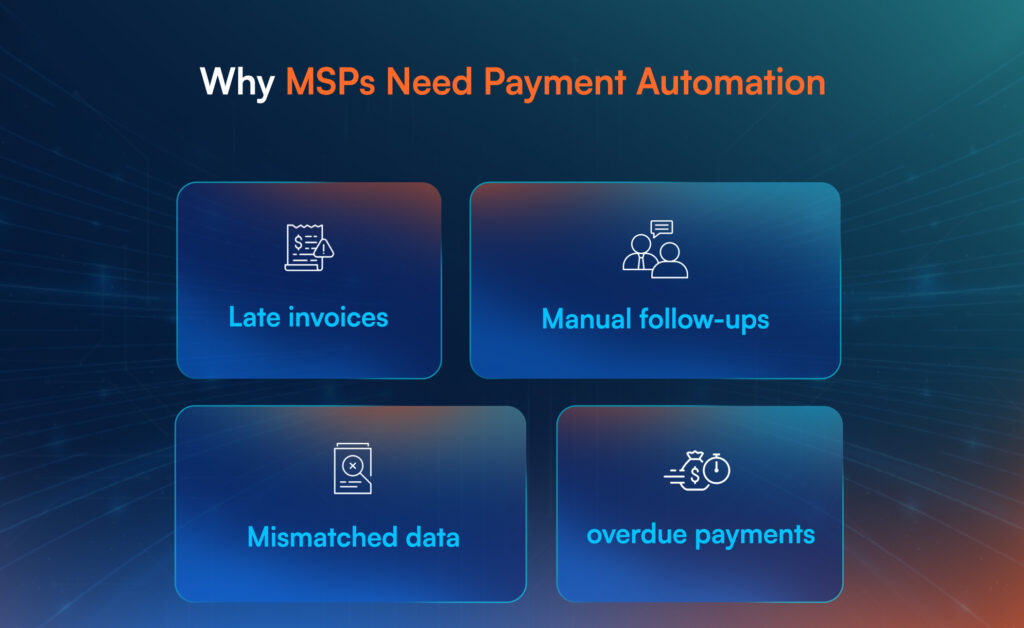
For MSPs, that typically shows up as:
- Monthly cash flow swings that do not match booked revenue
- More time spent chasing payments instead of growing accounts
- Higher risk of write-offs and disputes
Manual Billing Creates Errors And Disputes
Billing disputes rarely start as “the customer is difficult.” They usually start as:
- A mismatch between PSA ticket time and the invoice line items
- Missing approvals, incomplete work notes, or unclear service descriptions
- Wrong plan tier, incorrect device counts, or outdated pricing terms
- Confusing taxes, currency rules, or inconsistent invoice formats
Automation does not remove the need for good processes, but it reduces repeated manual steps, which is where mistakes multiply.
Payment Rails And Buyer Expectations Differ By Region
If you sell to US customers, ACH and card payments are common for recurring billing. ACH volumes continue to grow at scale, with the ACH Network handling 33.6 billion payments in 2024. (LSEG)
In India, clients increasingly expect modern digital payment experiences. Government data highlights that UPI has grown rapidly, reaching 13,116 crore transactions in FY 2023–24. (financialservices.gov.in)
This is why “payments” is not just a finance feature. It is a client experience layer that affects retention and renewals.
Closing Thought: Payment automation is not about fancy billing screens. It is about building a reliable system where service delivery turns into cash without delays and surprises.
Core Capabilities To Look For In MSP Payment Automation Software
This is the section where most MSPs make the wrong decision: they compare “features,” not workflows. The right tool depends on your billing model and what you want to automate end-to-end.
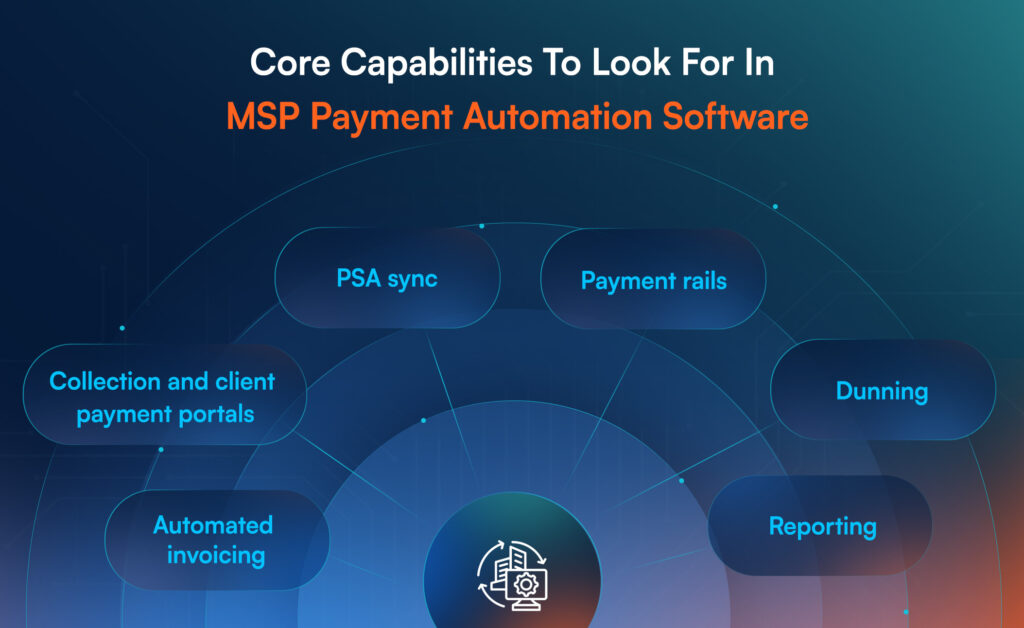
Automated Invoicing And Recurring Billing
Look for automation that can:
- Generate invoices on a schedule (monthly, quarterly, annual)
- Handle proration, mid-cycle adds, and cancellations
- Support fixed-fee managed services plus variable ticket-based work
- Attach approvals and work logs when needed
Recurring billing is where MSP revenue lives. If this part is weak, everything downstream becomes manual again.
Collections And Client Payment Portals
Collections features should support:
- Payment links embedded in invoices
- Self-serve portals where clients can view invoices and pay
- Auto-pay, saved payment methods, and scheduled payments
- Receipts, confirmations, and clear status updates
This reduces follow-up work and improves the “professional” feel of your billing process.
PSA And Accounting Sync
The most important integration question is: what becomes the system of record for billing?
At minimum, you want:
- PSA agreement items and ticket time to map correctly into invoice lines
- Invoice status to update when payment is received
- Accounting entries to stay consistent (invoice, payment, fee, deposit)
If PSA and accounting drift apart, your team spends more time reconciling than selling.
Payment Gateway And Regional Payment Options
In the US: ACH and cards are typically must-haves for recurring collections. (LSEG)
In India: make sure you can support the rails your buyers use (often UPI-driven expectations), even if your backend settlement flow depends on your payment provider setup. (financialservices.gov.in)
Also check:
- Surcharges and convenience fees rules (if you plan to pass fees)
- Multi-currency support (if you serve overseas clients)
- Payout and settlement timelines
Dunning, Reminders, And Dispute Handling
This is where revenue quietly leaks.
You want:
- Automated reminders based on days overdue
- Retry schedules for failed payments
- Clear tracking of partial payments and short pays
- Dispute workflows that capture notes and decisions
Reporting For Cash Flow And Profitability
Payment automation is incomplete without reporting that helps you answer:
- What is overdue, and why?
- Which clients are chronic late payers?
- How much revenue is stuck in disputes?
- What is collected vs billed vs booked?
Closing Thought: The “best” MSP payment automation software is the one that reduces manual touchpoints across invoicing, collections, and reconciliation, without breaking your PSA and accounting truth.
Who Uses MSP Payment Automation Software And Why?
Most people assume payment automation is only for larger MSPs. In reality, it becomes valuable as soon as you have recurring billing and multiple clients.
Small MSPs use it to reduce admin load and avoid cash flow surprises. They typically want simple recurring billing, payment links, and basic accounting sync.
Mid-sized MSPs use it to handle complexity: multiple agreements, ticket-based billing, add-ons, hardware, and renewals. They need stronger PSA mapping, better approvals, and less spreadsheet work.
Larger MSPs use it to control revenue operations: standard billing cycles, fewer disputes, stronger reporting, and better governance across teams. They also care more about security controls, role-based access, and audit trails.
Across US and India, the “why” stays the same:
- Reduce late payments and improve predictability (Atradius)
- Make invoices consistent and reduce disputes
- Save time on repetitive invoicing and follow-up work
- Get clean data for profitability reporting and planning
Closing Thought: If your growth depends on recurring revenue, payment automation is not optional. It is part of building a stable MSP operating model.
A Practical Workflow: How MSP Payment Automation Works End-to-End
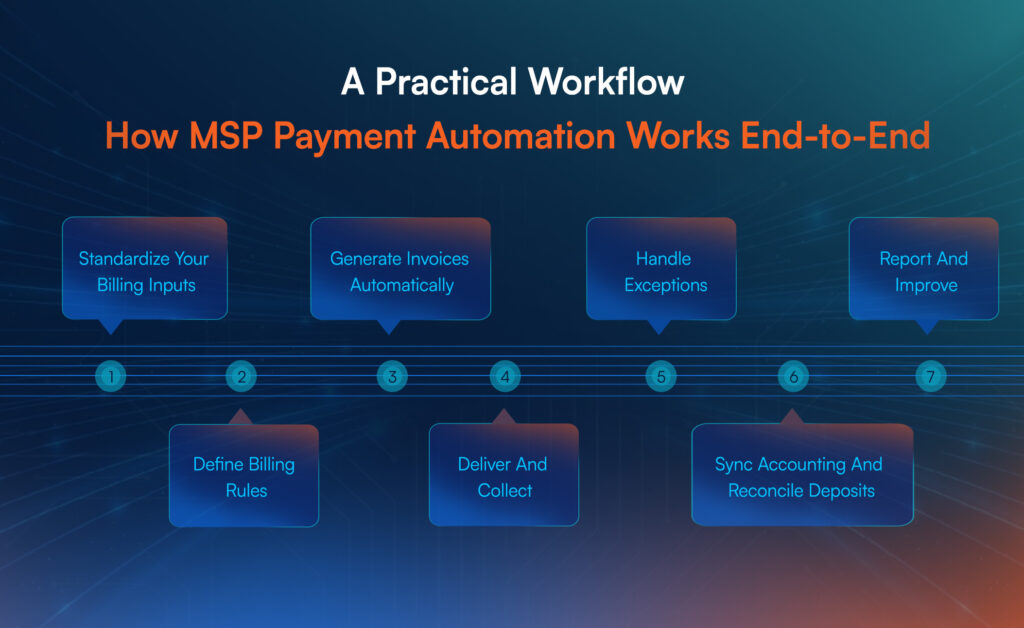
A good automation setup usually follows this flow:
Step 1: Standardize Your Billing Inputs
Clean contracts, confirm pricing, define service bundles, and ensure PSA agreements match what you sell.
Step 2: Define Billing Rules
Set rules for recurring services, usage-based items, ticket-based work, proration, and taxes.
Step 3: Generate Invoices Automatically
Invoices get created from PSA and billing schedules, with consistent line item logic.
Step 4: Deliver And Collect
Invoices go out with payment options, client portal access, and optional auto-pay.
Step 5: Handle Exceptions
Failed payments, disputes, and partial pays follow defined steps (reminders, retries, escalation).
Step 6: Sync Accounting And Reconcile Deposits
Payments, fees, and deposits update accounting so finance reporting stays accurate.
Step 7: Report And Improve
Overdue patterns, DSO, and dispute reasons become visible, so you improve the process.
This is also where many MSPs see the biggest internal shift: billing becomes a system, not a monthly fire drill.
Implementation Checklist For MSPs
Payment automation succeeds when you treat it like a process upgrade with clear ownership, not a tool install. Most failures happen because MSPs automate broken inputs: messy agreements, unclear pricing, inconsistent time tagging, or weak approval routines. Use this rollout checklist to stabilize the foundation before you automate the cycle.
Implementation Checklist Table
| Phase | What You Must Set Up | Output You Should Expect | ||
| Billing Data Cleanup | Standard service names, SKUs, agreement templates, pricing rules | Clean catalog and consistent invoice structure | ||
| Contract And Agreement Alignment | Agreement items match what clients pay for, renewal dates confirmed | Fewer billing disputes, less leakage | ||
| PSA Rules | Time entry standards, billable vs non-billable tags, approvals | Accurate invoice lines tied to work | ||
| Payments Setup | Payment rails, fees policy, auto-pay options, settlement rules | Faster payments and fewer delays | ||
| Dunning And Exceptions | Reminder rules, retries, dispute handling steps, escalations | Reduced follow-up workload | ||
| Accounting Mapping | Chart of accounts mapping, tax handling, deposit reconciliation approach | Cleaner month-end close | ||
| Client Rollout | Pilot group, communication plan, portal onboarding, feedback loop | Adoption without confusion and churn | ||
| Reporting Layer | KPIs: overdue rate, DSO trend, dispute rate, write-offs | Visibility and continuous improvement |
Start with 10–20 clients that represent your typical billing patterns. Automate recurring invoices first, then add collections workflows (payment links + reminders), then sync accounting. Only after that, expand to usage-based charges.
Common Mistakes MSPs Make With Payment Automation
The biggest mistake is assuming automation will “fix” finance problems. Automation only amplifies whatever system you already have.
If your agreements are inconsistent, pricing is unclear, or approvals are weak, automation will generate faster chaos. Fix the structure first, then automate the cycle.
Mistake 1: Automating Messy Agreements And Pricing
When agreement items do not match what clients believe they purchased, every invoice becomes a negotiation.
- Fix: Standardize packages, clearly name services, and lock pricing logic before rollout.
Mistake 2: Ignoring The Exceptions Workflow
Most revenue leakage happens in exceptions: failed payments, partial pays, disputes, and mid-cycle upgrades.
- Fix: Build dunning rules, retry logic, and dispute accountability before going live.
Mistake 3: Treating PSA And Accounting Like Separate Truths
If PSA shows one reality and accounting shows another, your team will reconcile forever.
- Fix: Decide the source of truth for invoice status and ensure mappings are stable.
Mistake 4: Rolling Out To All Clients At Once
A full rollout without a pilot turns one billing error into dozens of angry emails.
- Fix: Pilot with representative accounts, fix patterns, then scale.
Mistake 5: Not Tracking Collection Performance Metrics
If you do not track overdue rate, dispute rate, and DSO trend, you cannot improve.
- Fix: Review finance KPIs weekly, not at month end.
Best MSP Payment Automation Tools And Platforms
Below is a short shortlist to help buyers navigate options. Treat this as a starting point, not a recommendation.
- AppGallop
Best fit when you want payment automation connected to subscription operations, usage-based billing, and cloud marketplace workflows, especially if you sell cloud, SaaS, or recurring digital services through multiple channels.
- FlexPoint
Often positioned around MSP billing and payments, with a focus on helping MSPs accept payments and manage collections workflows.
- Zomentum
Known for MSP sales-to-billing workflows, with billing and payments as part of a broader MSP commercial process.
- N-able MSP Manager, Work 365, And Similar Options
Commonly used by MSPs depending on their PSA and billing stack, with strengths varying by integration and billing model.
Choose based on how well the platform supports your actual billing model: recurring, usage-based, ticket-based, or blended.
AppGallop For MSP Payment Automation And Cloud Marketplace Billing
Most MSP payment tools are built for standard recurring invoices. The moment your revenue includes cloud resale, SaaS subscriptions, tiered bundles, add-ons, and usage events, “billing” becomes a subscription operations problem.
The real challenge is not collecting payments. The real challenge is ensuring what you provision and what you bill always match, even when customers upgrade, downgrade, add seats, or change usage mid-cycle.
AppGallop supports MSPs that want to run payment automation as part of a broader cloud marketplace and subscription workflow. Instead of stitching together separate systems for catalog, subscriptions, billing, and reconciliation, AppGallop helps you run a controlled flow from offer to invoice.
AppGallop Capabilities In Pointer Format (What You Can Run End To End)
1) Catalog And Offer Structuring For Recurring Revenue
- Structure services into plans, bundles, add-ons, and tiers
- Keep pricing logic consistent across customer types and regions
- Reduce invoicing ambiguity by standardizing what is sold
2) Subscription Lifecycle Control
- Track upgrades, downgrades, cancellations, and co-terms
- Maintain renewal visibility and prevent missed expansions
- Keep subscription changes tied to billing events
3) Usage And Consumption Billing Support
- Capture usage and convert it into billable charges based on rules
- Support true-ups, prorations, and mid-cycle adjustments
- Reduce underbilling, which is common in cloud resale models
4) Finance-Ready Billing And Reconciliation Workflows
- Generate accurate invoices tied to subscription and usage events
- Maintain visibility into what was billed vs collected vs overdue
- Reduce reconciliation overhead by keeping operational events connected to billing records
Why This Matters For MSPs
MSPs that sell cloud and SaaS often grow revenue faster than their billing maturity. That creates silent leakage: unbilled upgrades, missed true-ups, delayed renewals, and disputes caused by unclear invoice composition. AppGallop’s value is in reducing those leakage points by connecting marketplace operations to billing logic in a structured way.
If cloud resale is part of your growth, you need payment automation that understands subscription reality, not just invoice generation.
Looking for a All-in-One MSP Payment Automation Platform? Book a Free Demo Today!
Conclusion
MSP payment automation software is not a finance upgrade. It is a growth and operations upgrade. When billing and collections run on a repeatable workflow, you reduce disputes, improve cash visibility, and stop revenue from leaking through manual gaps.
If your MSP is adding clients, expanding services, or selling recurring cloud subscriptions, automation becomes the difference between “revenue on paper” and “cash in the bank.” Start by choosing a workflow to automate end-to-end, pilot it with a subset of clients, then standardize it across your book.
FAQs
MSP payment automation software is a system that automates invoicing, collections, and payment tracking for MSPs by connecting PSA data, billing rules, and accounting updates into one workflow.
Payment automation does not replace your PSA or accounting tool, it connects them so invoices, payments, and reconciliation stay consistent without repeated manual entry.
MSP payment automation can handle recurring billing and usage-based charges when the platform supports subscription schedules, proration, usage rating, and rules that convert usage into invoice lines.
MSPs should support ACH and card payments for many US customers, and a digital-first payment experience for Indian customers where expectations are shaped by UPI-scale adoption.
MSPs reduce billing disputes with automation by mapping PSA tickets and contracts to invoice line items, attaching clear service descriptions, and running approvals before invoices go out.